Blog > Your Data Leaves the Building the Moment You Hit "Upload"

David Herse | March 23, 2026
Your Data Leaves the Building the Moment You Hit “Upload”
We’re in the golden age of APIs. Need to geocode a million addresses? There’s an endpoint for that. Want demographic enrichment on your customer list? POST it somewhere and wait for the JSON response.
Here’s the thing that keeps your Data Protection Officer up at night… what exactly did you just send, and where?
That CSV you uploaded to a geocoding service had full names in column B. The “notes” field in row 412 contains someone’s Medicare number because a field worker typed it there six months ago. The coordinates in columns F and G can pinpoint a person’s home to within three metres.
You didn’t mean to share PII. You just wanted a location to put on a map.
The problem isn’t the tools. It’s the workflow.
Most data teams I talk to are careful people. They care about privacy. They read the legislation. But their workflow looks like this: export from a system, open in Excel, maybe eyeball a few rows, then feed it into whatever tool or API does the next job.
That middle step, the eyeballing, doesn’t scale. You can’t visually scan 50,000 rows for a phone number buried in a free-text comment field. You can’t spot that one column of dates that happens to be dates of birth, not dates of service.
And honestly, you shouldn’t have to.
Why I built Mapulus Transform
I run Mapulus, a mapping and spatial analytics platform. People send us location data all the time. And it hit me, pretty early on, that a lot of what lands in our pipeline contains stuff that has no business being there. Names. Emails. Addresses paired with coordinates that together become a home location.
So I built Mapulus Transform as a standalone desktop app. Not a web service. Just a local tool that sits on your machine and does one thing well: finds the sensitive stuff in your data before it goes anywhere else.
It scans columns using pattern matching and a small Natural Language Processing model to flag PII. Not just the obvious things like emails, but also Australian-specific patterns like TFNs and Medicare numbers. It catches PII hiding inside free-text fields. For each column, you choose what happens: keep it, drop it, redact it, or replace it with synthetic data that looks real but isn’t.
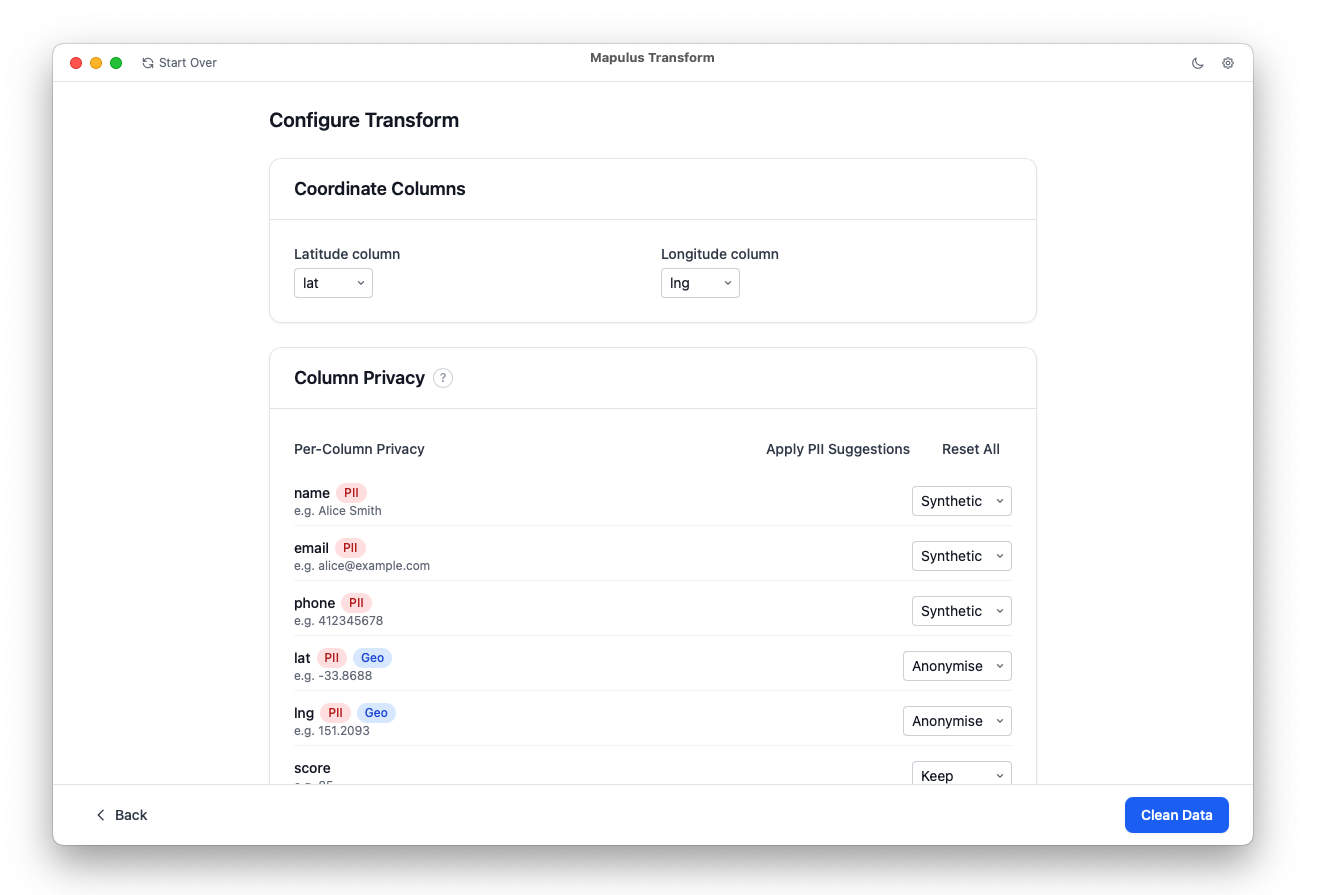
The coordinate handling is the part I’m most proud of. Instead of shipping exact lat/longs to an API, you can jitter them, snap them to ABS statistical boundaries, or drop them entirely. You get the spatial analysis you need without the precision that could make the data personally identifiable.
Every run produces an audit report. Because “we cleaned it” isn’t an answer your privacy officer should accept. “We cleaned it, here’s exactly what we found and what we did about it” — that’s the answer.
The bigger point
We’re building increasingly powerful data workflows. Enrichment APIs, AI models, cloud analytics, all of them hungry for your CSVs. That’s genuinely useful.
But the convenience has outpaced the hygiene. The gap between “export” and “upload” is where privacy incidents live. And most teams are bridging that gap with hope and good intentions.
Transform is my attempt to put something concrete in that gap. Something that runs locally, works offline, and doesn’t ask you to trust yet another cloud service with the data you’re trying to protect.
Your data should be clean before it leaves the building. Not after.
Mapulus Transform is currently in early access. If your team works with sensitive location data and you’d like to try it, join the waitlist — I’d love to hear how you’re handling this problem today.